4-Step Roadmap to AI Agents for Google Ads Success
Everyone wants an AI agent for their ad account. Here’s why the smart businesses wait, and what they do first.
By Snehal Singh | Published: August 17, 2026
AI Overview Summary
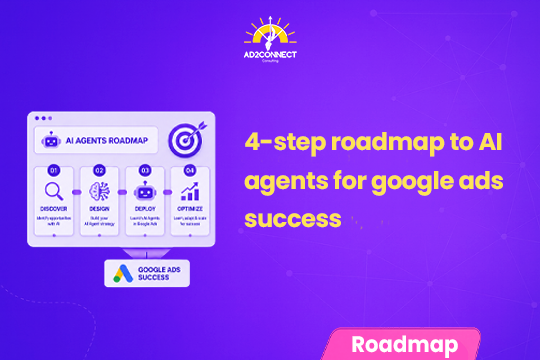
AI agents for Google Ads are tools that can check your account, spot problems, and even take action on their own. But most businesses aren’t ready to build one yet. There are four steps to get there. First, clean up your data and business information. Second, try free AI tools like ChatGPT or Claude before spending money. Third, build a custom AI agent only if the free tools aren’t enough. Fourth, get your team comfortable with AI before rolling it out everywhere. Skipping straight to “build an agent” is why most AI projects in Google Ads fail to deliver.
Table of Contents
- Why Everyone’s Talking About AI Agents
- The Real Problem: Businesses Skip the Boring Part
- Step 1: Get Your Foundation Right
- Step 2: Try Free AI Tools First
- Step 3: Build a Custom AI Agent Only If You Need It
- Step 4: Get Your Team Ready Too
- Off-the-Shelf AI vs Custom AI Agents
- Mistakes That Look Like Strategy
- How Ad2Connect Approaches AI Agents for Google Ads for Clients
- Key Takeaways
Why Everyone’s Talking About AI Agents
Open LinkedIn any day and someone is talking about AI agents for Google Ads. Google keeps adding new AI features to Ads and Analytics. Software companies are selling “AI employees” that run campaigns on their own.
It’s easy to think you need to build an AI agent right away. Before a competitor beats you to it.
That’s not entirely wrong. But for most businesses, it’s too early.
We’ve watched many teams try to build AI systems for Google Ads over the past year. One thing stands out. The businesses that get real results follow the same order of steps. The ones that struggle usually skip ahead to the exciting part: building the agent.
The Real Problem: Businesses Skip the Boring Part
Here’s a common mistake. People think AI fixes messy processes. It doesn’t.
AI just makes those messy processes move faster.
Say your product details sit in five different spreadsheets. Your campaigns have no naming system. Nobody agrees on your brand’s tone. Handing this mess to AI won’t fix it. It just makes mistakes happen faster, at a bigger scale.
This is why so many “AI-powered” ad campaigns quietly fail. The AI was never given clean information to work with. No AI model, however smart, can turn messy data into a smart decision.
So the real roadmap doesn’t start with “which AI tool should I buy.” It starts somewhere less exciting.
Step 1: Get Your Foundation Right
Before touching any AI tool, fix two things. Your knowledge base and your data. Most businesses skip this step because it isn’t fun.
An AI tool is only as good as the information you give it. Even the smartest AI can’t make good decisions if your business details live only in someone’s head. Or if your data is scattered across five different platforms.
Write down the basics AI needs to know:
- Your products and services
- Your business rules, like discounts and approval limits
- Your brand’s tone of voice
- Your campaign structure and naming style
- Your internal processes, like who approves what
Also make sure your marketing data is connected and accurate. It doesn’t matter much if you use a big data tool like BigQuery or something simpler. What matters is that your data isn’t stuck in separate silos.
Step 2: Try Free AI Tools First
Good news. You don’t need a developer or a big budget to start using AI in Google Ads. Most businesses haven’t even used all that free AI tools can already do.
Start simple. Export your campaign data. Ask ChatGPT or Claude to check your account structure. Ask it to find wasted spend or new keyword ideas. Today’s AI models are good at spotting patterns in large amounts of data. Patterns that used to take hours to find by hand.
Once you’re comfortable, connect these tools directly to Google Ads, Google Analytics, or Google Merchant Center. This is done through pre-built connectors called Model Context Protocol (MCP). Instead of exporting a new spreadsheet every week, you can ask questions using live data. And the AI remembers your business context each time.
For most small and mid-sized businesses, this alone covers most of what you’ll ever need. Move to the next step only once you’ve truly outgrown this setup.
Step 3: Build a Custom AI Agent Only If You Need It
At some point, free tools stop being enough. This usually happens when your needs get very specific.
Maybe you want AI to combine ad performance with stock levels, pricing, and CRM data, all at once. Maybe you want AI to watch your account non-stop, not just answer questions when asked. Or you want it to approve certain actions automatically, while keeping a human involved for anything risky.
That’s when it’s time to build something custom.
Developers make these systems reliable, not just impressive as a demo. Custom connections, safety checks, scheduling, and cost controls turn a cool experiment into a tool you can trust every day.
Step 4: Get Your Team Ready Too
Here’s a surprise. The biggest hurdle in AI adoption usually isn’t the technology. It’s people.
Businesses that move fastest don’t expect everyone to become an AI expert overnight. They find a few excited early adopters. They let those people experiment and share what works. Then, slowly, the rest of the team picks it up too.
AI isn’t replacing marketers. It’s changing where they spend their time. Smart bidding, broad match, and Performance Max already automated a lot of the manual work in Google Ads. AI agents are just the next step in that same shift. Marketers get to spend less time on repetitive tasks and more time on strategy.
Off-the-Shelf AI vs Custom AI Agents
| Factor | Free AI Tools (ChatGPT, Claude, MCP) | Custom AI Agent |
|---|---|---|
| Setup cost | Low, often free or low-cost | High, needs developers |
| Time to see results | Days | Weeks to months |
| Best for | Audits, reports, keyword research | Non-stop monitoring, multi-source automation |
| Data needs | Manual export or basic connectors | Deep, real-time data connections |
| Ongoing upkeep | Minimal | Needs dedicated tech support |
| Who should start here | Most small and mid-sized businesses | Businesses that outgrew free tools |
Mistakes That Look Like Strategy
Most wasted AI budget in Google Ads comes from the same few habits:
- Jumping straight to “build an AI agent” before fixing the data
- Assuming an expensive custom system beats a free tool, without even testing the free option
- Treating AI adoption as a tech project instead of a people project
- Trying to automate everything, instead of using AI where it’s actually good
- Expecting AI to fix a process that was already broken
- Rolling AI out to the whole team at once, instead of starting small
How Ad2Connect Approaches AI Agents for Google Ads for Clients
At Ad2Connect, one of the trusted performance marketing agencies in Mumbai, this step-by-step approach guides how we help SaaS, eCommerce, D2C, and local business clients use AI in Google Ads. Before we suggest any AI tool, custom or free, we first check the client’s data quality and business documentation. That groundwork decides whether any AI tool will actually be useful.
This often connects to other work on our blog. Messy data is often a symptom of technical SEO debt sitting underneath the account. A business that hasn’t figured out how to measure brand visibility in AI search usually isn’t ready to hand decisions to an AI agent either.
As a full-service digital marketing agency in Mumbai, we pair this readiness check with the same free-tool techniques covered above, so clients get quick wins right away while we figure out if a custom build is worth it. Clients who come to us through our best SEO agency in Mumbai services often ask about AI agents at the same time, since both depend on the same clean, well-organized data foundation.
The businesses that get real value from AI treat it as a journey with four steps, not one purchase. If you’re not sure your Google Ads account is ready for an AI agent, that’s exactly the kind of check our paid media team runs for clients.
Key Takeaways
- Fix your foundation first. AI speeds up whatever process you already have, messy or clean. Clean it up before AI touches it.
- Try free tools before you build. ChatGPT, Claude, and MCP connectors cover most needs for small and mid-sized advertisers.
- A custom AI agent is a later step, not a first step. Build one only once free tools stop being enough.
- People matter as much as technology. A few early adopters will get you further than forcing AI on the whole team at once.
- The goal isn’t full automation. Let AI handle repetitive, data-heavy tasks so your team can focus on strategy.
Ad2Connect is a digital marketing agency helping SaaS, eCommerce, D2C, and local businesses grow through data-driven SEO, performance marketing, and content strategy. If you’re exploring AI agents for your Google Ads account and want an honest opinion on whether you’re ready, talk to our paid media team.