Technical SEO Audit Mistakes That Cost You Rankings
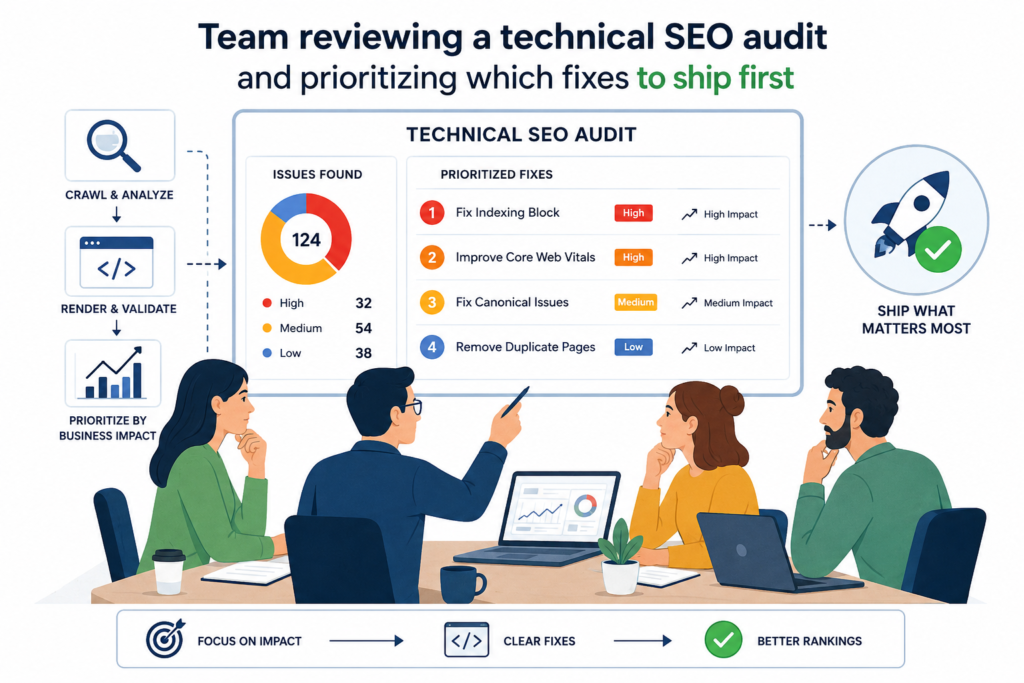
A crawl tool can list every problem on your site in minutes. Knowing which ones are actually costing you rankings — that part still takes a human.
By Snehal Singh | Published: September 3, 2026
AI Overview Summary
Technical SEO audits fail for a predictable reason: a crawler sorts issues by severity, not by business impact, so the report ends up prioritizing the wrong fixes. Add in findings that are too vague for a developer to act on, and most audits quietly turn into a document that nobody implements. The pages that actually drive revenue keep the bugs they had before the audit was run. Fixing this doesn’t require better tools — it requires re-ranking every finding against real business priorities, comparing rendered HTML against raw HTML, remembering that AI crawlers rarely execute JavaScript, and writing each recommendation as an instruction a developer can follow without a follow-up call. Agencies that build this validation step into every technical SEO audit turn findings into shipped fixes instead of ignored reports.
Table of Contents
- What a Technical SEO Audit Is Supposed to Catch
- Why So Many Audits Never Turn Into Fixes
- 7 Technical SEO Audit Mistakes That Cost You Rankings
- 1. Trusting the Crawler’s Severity Score Over Business Priority
- 2. Skipping the Rendered-vs-Raw HTML Comparison
- 3. Forgetting AI Crawlers Rarely Render JavaScript
- 4. Auditing Without Asking the Business Any Questions
- 5. Writing Findings No Developer Can Act On
- 6. Testing Only the Homepage, Not Every Key Template
- 7. Handing Over a Report With No Implementation Plan
- Mistake, Symptom, Fix: A Quick Diagnostic Table
- Mistakes That Look Like Strategy
- How Ad2Connect Approaches Technical SEO Audits for Clients
- Key Takeaways
- FAQ: Technical SEO Audit Mistakes
What a Technical SEO Audit Is Supposed to Catch
A technical SEO audit exists to answer one question: what is stopping search engines from finding, understanding, and ranking your most important pages?
Most audits, in practice, answer a smaller question instead — what did the crawler happen to flag today? Those two questions sound similar. They are not, and the gap between them is where audits quietly stop being useful.
A crawl tool like Screaming Frog or Sitebulb is genuinely good at finding symptoms. It has no idea which product page earns the most revenue, which category the business is pushing this quarter, or which template is scheduled for deletion in next month’s redesign. That context only comes from a human conversation, and skipping it is the root cause behind nearly every mistake below.
Why So Many Audits Never Turn Into Fixes
Ask any SEO team a blunt question: of the last audit you delivered, how many findings actually got shipped?
Honestly, usually not many. The document gets shared in a meeting, a few easy wins get patched, and the rest sits untouched in a shared drive for months.
It’s easy to blame the client here — busy teams, slow developer queues, shifting priorities. Sometimes that’s fair. More often, the fault sits with the audit itself. Somewhere between the crawl and the delivery, the findings were never checked against what the business actually cares about, were never re-ranked beyond a tool’s generic severity labels, and were never written clearly enough for a developer to pick up and execute without a clarifying call — and a five-thousand-row spreadsheet full of “critical,” “warning,” and “notice” tags can look impressively thorough while still being functionally useless, because thoroughness was never the problem; prioritization and clarity were, and those two gaps are exactly where the seven mistakes below tend to happen.
7 Technical SEO Audit Mistakes That Cost You Rankings
1. Trusting the Crawler’s Severity Score Over Business Priority
Every crawl tool sorts issues into buckets like “critical,” “warning,” and “notice.” That label is based purely on the type of issue — a missing title tag is flagged the same way whether it’s on your homepage or an archived page nobody visits.
The tool can’t know that a “critical” title tag issue sits on a template your team is retiring next quarter, while a “low priority” rendering warning is quietly breaking your highest-margin product pages. Following severity labels blindly means fixing things in the right order for a robot and the wrong order for the business.
Fix it: Re-rank every finding against two questions — which pages actually convert, and what’s launching or changing soon? Build your priority list around those answers instead of the crawler’s default sort.
2. Skipping the Rendered-vs-Raw HTML Comparison
Most modern websites load part of their content through JavaScript, after the page’s initial HTML arrives. Google generally renders that content fine, but “generally” is not “always.”
A blocked script, a coding error, or a timeout can leave JavaScript-loaded content out of the index entirely — even though the page looks completely normal to a person browsing it.
Fix it: Turn on JavaScript rendering in your crawl tool and store both the raw HTML and the rendered HTML. Comparing the two shows you exactly which body copy, internal links, canonical tags, or meta robots directives only exist after the script runs.
3. Forgetting AI Crawlers Rarely Render JavaScript
This mistake has gotten costlier over the last couple of years. Google can render JavaScript reasonably well. Most crawlers powering AI chatbots and AI-generated answers cannot — they typically read only the raw HTML response.
That means a page can rank normally in Google while being completely invisible to the systems generating AI answers, simply because its key content only appears after a script runs.
Fix it: For any page you want cited in AI answers, make sure the core content — the actual sentences answering the query — exists in the raw HTML, not only in the JavaScript-rendered version.
4. Auditing Without Asking the Business Any Questions
A crawl report and a technical SEO audit are not the same deliverable. The crawl is raw data. The audit is judgment applied to that data.
Skipping the conversation with the business — priority products, upcoming launches, which pages the sales team actually sends to prospects — means the audit is guessing at priorities instead of confirming them.
Fix it: Before finalizing any recommendation list, ask the client or your product team a short set of questions: which pages matter most right now, what’s changing soon, and what’s already been tried without success.
5. Writing Findings No Developer Can Act On
“Fix duplicate title tags” is a diagnosis, not an instruction. A developer reading that line still has to figure out which template is generating the duplicates, what the correct title logic should be, and how many pages are affected.
Vague findings are one of the biggest reasons audits stall after delivery — not because the fix is hard, but because nobody wrote down exactly what to do.
Fix it: For every finding, document the cause, the business impact, the exact pages or templates affected, and the specific change needed. A crawler can find the symptom; your audit needs to explain the cause and the cure.
6. Testing Only the Homepage, Not Every Key Template
Page speed, mobile usability, and rendering behavior can vary sharply between templates. A homepage that scores well tells you almost nothing about how your product pages, category pages, or blog template actually perform.
Auditing only the homepage — or a handful of random pages — creates a false sense of health across the rest of the site.
Fix it: Test at least one representative page from every major template: homepage, category, product or service page, and blog post. Issues found on one template usually repeat across every page that uses it.
7. Handing Over a Report With No Implementation Plan
Even a perfectly prioritized, perfectly written audit dies quietly if it lands in an inbox with no next step attached. A PDF is not a task list, and a task list nobody owns is not a plan.
Fix it: Convert every accepted finding into a tracked task with an owner and a rough timeline before calling the audit “delivered.” Findings that live only in a document rarely become findings that ship.
Mistake, Symptom, Fix: A Quick Diagnostic Table
| Mistake | What It Looks Like | The Fix |
|---|---|---|
| Trusting crawler severity | Low-value warnings ranked above a broken revenue page | Re-rank by business priority, not tool labels |
| Skipping rendered vs. raw HTML | Content looks fine in-browser but is missing from the index | Compare rendered and raw HTML in the same crawl |
| Ignoring AI crawler limits | Page ranks in Google, never appears in AI answers | Keep core content in raw HTML, not JS-only |
| No business context | Recommendations that don’t match real priorities | Ask the client before finalizing the list |
| Vague findings | Developers unsure exactly what to change | Document cause, impact, pages affected, exact fix |
| Homepage-only testing | Category and product templates never actually checked | Test one page per major template |
| No implementation plan | Report sits in a shared drive for months | Turn findings into owned, tracked tasks |
Mistakes That Look Like Strategy
- Running the audit and calling it done, with no plan for who implements what.
- Fixing every “critical” item first, purely because the tool labeled it that way.
- Auditing a redesign-bound template nobody asked about.
- Assuming Google and AI crawlers see a page identically.
- Delivering a 5,000-row export instead of a prioritized, readable list.
- Skipping the follow-up call that would have surfaced the real business priorities.
How Ad2Connect Approaches Technical SEO Audits for Clients
At Ad2Connect, every technical SEO audit starts with a business conversation, not a crawl. Before we run a single tool, we ask which pages actually drive revenue, what’s launching next quarter, and what’s already been tried. That context shapes how we prioritize everything the crawl later finds.
As a Top SEO Company In Mumbai, India, our audits go past the standard checklist. We compare rendered and raw HTML, check how key templates perform individually rather than testing only the homepage, and write every finding as a clear instruction — cause, impact, pages affected, and exact fix — so a developer never has to guess.
That approach is part of why businesses across Mumbai and beyond come to us as a Best Digital Marketing Agency in Malad. We don’t stop at a report. Findings get turned into a tracked, owned action plan, and where technical fixes need to work alongside paid growth, our Performance Marketing Services In Mumbai team makes sure the pages worth fixing are also the pages worth sending traffic to.
If your last technical SEO audit is still sitting in a shared drive untouched, that’s exactly the kind of audit our SEO and analytics team runs and implements for clients.
Key Takeaways
- A crawler finds symptoms. Your audit has to explain the cause. Severity labels alone don’t tell you what matters to the business.
- Always compare rendered HTML against raw HTML. Content that only appears after JavaScript runs isn’t reliably indexed.
- AI crawlers rarely render JavaScript. A page can rank in Google and still be invisible to AI-generated answers.
- Vague findings kill implementation. Write the exact fix, not just the diagnosis.
- An audit without an implementation plan is just a document. Turn findings into owned, tracked tasks before calling it done.
Ad2Connect is a digital marketing agency helping SaaS, eCommerce, D2C, and local businesses grow through data-driven SEO, performance marketing, and content strategy. If your last technical SEO audit never turned into shipped fixes, talk to our SEO team about running one that actually gets implemented.