Technical SEO Debt: What to Fix vs Ignore
A 40,000-error crawl report doesn’t mean 40,000 problems. Here’s the triage framework that separates the issues quietly costing you rankings from the ones you can leave alone.
By Snehal Singh | Published: July 28, 2026
AI Overview Summary
Technical SEO debt is the backlog of crawl, indexing, speed, and structural issues that accumulate on a site over time. Not all of it needs fixing. Debt splits into three tiers: revenue-blocking issues (broken indexing, redirect chains on money pages, Core Web Vitals failures on high-traffic templates) that should be fixed immediately; compounding issues (thin crawl budget waste, orphaned pages, inconsistent canonicals) that should be fixed on a scheduled cadence because they slowly erode performance; and cosmetic issues (minor schema warnings, non-indexable utility pages, low-value 404s) that are safe to deprioritize or ignore entirely. The mistake most teams make is treating every line in a Screaming Frog or Search Console report as equally urgent, which burns dev time on issues with zero ranking impact while the two or three fixes that actually matter sit untouched.
Table of Contents
- What Is Technical SEO Debt, Really?
- Why “Fix Every Error” Is the Wrong Strategy
- The 3-Tier Technical SEO Debt Triage
- How to Diagnose Which Tier an Issue Belongs To
- The Right Response for Each Tier
- Mistakes That Look Like Strategy
- How Ad2Connect Approaches Technical SEO Debt for Clients
- Key Takeaways
What Is Technical SEO Debt, Really?
Technical SEO debt is the gap between how a site is currently built and how it needs to be built for search engines to crawl, render, and rank it efficiently. It builds up the same way financial or code debt does: a redirect gets added instead of fixed at the source, a new template ships without canonical tags, a migration leaves a few thousand orphaned URLs behind. None of it breaks the site outright. It just quietly taxes crawl budget, indexing speed, and ranking potential until someone runs an audit and finds a four-figure error count.
That error count is where most teams go wrong. A crawler will flag a redirect chain on a checkout page and a missing alt tag on a footer icon with the same red exclamation mark. Both are technically “errors.” They are not remotely the same problem.
Why “Fix Every Error” Is the Wrong Strategy
The old approach to technical SEO was audit-and-clear: run the crawl, export the sheet, work through it top to bottom until the error count hits zero. That made sense when sites were smaller and crawlers reported fewer categories of issues.
It doesn’t hold up on a modern site with a few thousand URLs, a JavaScript framework, and a CMS that’s been through two redesigns. On sites that size, an audit routinely returns tens of thousands of flagged issues, and the overwhelming majority have no measurable effect on rankings or traffic. Treating the list as one undifferentiated backlog means a dev sprint gets spent fixing alt text on archived blog tags while a redirect chain on the pricing page keeps bleeding crawl equity and conversions.
That’s the real cost of unmanaged technical debt: not that the errors exist, but that fixing the wrong ones first delays fixing the ones that matter.
The 3-Tier Technical SEO Debt Triage
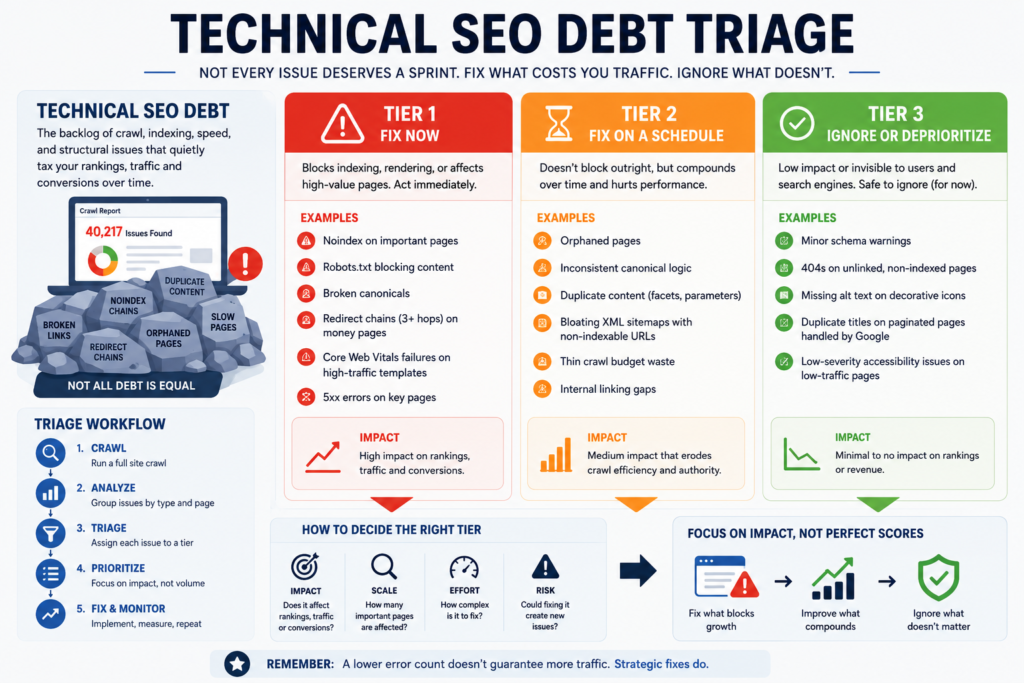
Every issue in a crawl report falls into one of three tiers. Sort by tier before you sort by severity label.
1. Tier 1: Fix Now
Signature: Blocks indexing, blocks rendering, or sits on a page that drives revenue or ranks for money keywords.
This is the debt that’s actively costing traffic or conversions today. A noindex tag left on after staging, a robots.txt line blocking a whole subfolder, a broken canonical pointing to the wrong URL, a redirect chain of three or more hops on a top-landing page, or a Core Web Vitals failure on the template used by your highest-traffic pages all belong here. These issues don’t just sit quietly; they actively suppress rankings or prevent a page from being evaluated at all.
2. Tier 2: Fix on a Schedule
Signature: Doesn’t block anything outright, but compounds — it wastes crawl budget, dilutes authority, or confuses search engines about which page to rank.
Orphaned pages with no internal links, inconsistent canonical logic across a template, duplicate content from faceted navigation or URL parameters, and a bloated XML sitemap full of non-indexable URLs all fall here. None of these will tank a page overnight. Left alone for a year, they steadily reduce how efficiently a site gets crawled and how clearly authority flows to the pages that should rank.
3. Tier 3: Ignore or Deprioritize
Signature: Flagged by a crawler, invisible to rankings or users.
Minor schema warnings on non-critical properties, 404s on pages that were never linked or indexed, missing alt text on decorative icons, low-severity accessibility flags on a legacy page nobody visits, or duplicate title tags on paginated URLs that Google already handles correctly. These generate the bulk of a crawl report’s line count and almost none of its ranking impact. Fixing them isn’t wrong, it’s just never the thing that should be first in line.
How to Diagnose Which Tier an Issue Belongs To
You don’t need a new tool stack for this. Google Search Console, a crawler like Screaming Frog, and GA4 cover almost every decision.
Pull three data points for each flagged issue category:
- Page-level traffic or revenue — does this affect a page that already earns clicks or conversions, or one that never did?
- Indexing status in Search Console — is the page actually excluded from the index, or just flagged with a warning?
- Crawl frequency — is Googlebot still visiting this page regularly, or has it effectively stopped?
| Blocks indexing/rendering? | On a high-value page? | Crawl impact | Tier |
|---|---|---|---|
| Yes | Yes or No | High | Tier 1 |
| No | Yes | Moderate | Tier 1 or 2 (check traffic loss) |
| No | No | Moderate | Tier 2 |
| No | No | Negligible | Tier 3 |
Before triaging anything else, run one sanity check: cross-reference the flagged URLs against your top 20% of pages by organic traffic or revenue. If an issue sits exclusively on pages outside that group, it almost never belongs in Tier 1, no matter how alarming the crawler’s severity label looks.
One diagnostic caution: crawler-reported “duplicate content” and Search Console’s own duplicate-content exclusions aren’t always the same thing. A crawler will flag near-duplicate product variants that Google has already correctly consolidated via canonical tags with no ranking loss. Check the Page Indexing report before assuming a crawler warning represents lost visibility.
The Right Response for Each Tier
Once an issue is sorted, the response stops being a guess.
Tier 1: Fix immediately, verify in Search Console
- Patch the issue at the template or source level, not with a one-off manual edit that reappears on the next deploy.
- Request indexing or recrawl through Search Console once the fix ships, rather than waiting for Google to find it on its own schedule.
- Confirm the fix actually resolved in the Page Indexing report before marking it closed. A code fix that didn’t deploy correctly looks identical to an unfixed issue until you check.
Tier 2: Batch it into a recurring technical sprint
- Group these fixes into a quarterly technical SEO sprint rather than fixing them ad hoc as they’re found.
- Fix at the template level wherever possible; correcting one broken canonical rule across a template resolves hundreds of URLs at once.
- Reassess crawl budget and internal linking after each sprint; these are the issues that show gradual improvement, not overnight recovery.
Tier 3: Log it, don’t sprint it
- Keep a running list so nothing is silently forgotten, but don’t pull dev resources for it on its own.
- Bundle Tier 3 fixes into other work already touching that part of the site, like a template redesign or a content refresh.
- Recheck periodically whether a Tier 3 issue has quietly become Tier 2, for example, if a previously low-traffic page starts ranking and its ignored duplicate-title issue now matters.
Mistakes That Look Like Strategy
Most wasted technical SEO effort traces back to a short list of reflexes:
- Sorting a crawl report by error count instead of by business impact.
- Treating every red flag in an audit tool as equally urgent because the tool colored it red.
- Fixing Tier 3 issues first because they’re quick wins, while Tier 1 issues sit in a backlog.
- Running a full technical audit but never mapping the findings back to which pages actually drive traffic or revenue.
- Re-auditing every month instead of giving a fix cycle enough time to show up in Search Console data.
- Fixing symptoms one URL at a time instead of correcting the template or rule causing the issue at scale.
How Ad2Connect Approaches Technical SEO Debt for Clients
At Ad2Connect, this triage sits at the center of how we run technical SEO audits for clients across SaaS, eCommerce, D2C, and local businesses. Before we hand over a fix list, we map every flagged issue against indexing status, crawl frequency, and page-level traffic or revenue, so a client’s dev team spends its first sprint on the handful of issues actually suppressing rankings, not the hundreds that aren’t.
This triage builds directly on the fundamentals covered in our guide on how to prioritize technical SEO for real results, and it pairs with the diagnostic approach in our piece on content decay, since a page that looks like it’s losing traffic to content decay is sometimes actually carrying unresolved Tier 1 technical debt underneath. For teams monitoring this across a large site, our breakdown of using Google Search Console for SEO growth shows how to catch indexing issues before they compound, and pairs well with a broader performance marketing strategy so the traffic recovered from a fix actually converts.
That’s the difference between a technical SEO retainer that clears crawl reports for the sake of a lower error count, and one that spends dev hours only where the data says it will move rankings or revenue. If your last audit came back with a five-figure error count and no clear sense of where to start, that’s exactly the kind of triage our SEO and analytics team runs for clients.
Key Takeaways
- Triage before you fix. Not every crawl error is equal; sort by whether it blocks indexing and whether it sits on a page that already earns traffic or revenue.
- Watch indexing status and crawl frequency, not just error counts. A flagged issue on a page Google barely crawls carries a fraction of the weight of one on a top-traffic page.
- Know when to leave debt alone. Tier 3 issues are safe to log and defer; chasing them first delays the fixes that actually matter.
- Fix at the template level. A rule-level fix resolves hundreds of URLs at once; a one-off edit reappears on the next deploy.
- Make it a quarterly cadence, not a reactive audit triggered only after rankings have already dropped.
Ad2Connect is a digital marketing agency helping SaaS, eCommerce, D2C, and local businesses grow through data-driven SEO, performance marketing, and content strategy. If your last technical audit left you with more questions than priorities, talk to our SEO team about running a technical SEO debt triage.
Explore More Blogs
- Content Decay in 2026: 4 Types That Are Quietly Killing Your Traffic
- Google AI Mode Ads Hit 30% of Queries — What This Means for Your Leads
- SEO Performance Reporting That Drives ROI