GBP Address Update: Why Your Local Rankings Drop
By Snehal Singh | Published: July 29, 2026
AI Overview Summary
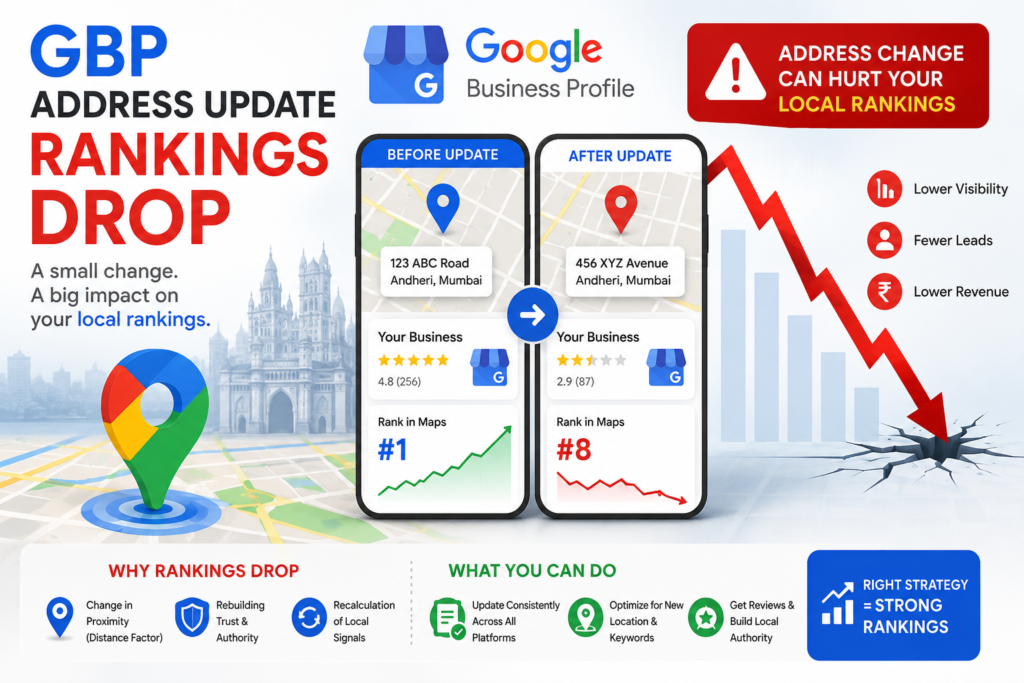
Updating a Google Business Profile (GBP) address commonly causes a temporary drop in Local Pack and Maps rankings because the change resets or disrupts the three signals Google’s local algorithm depends on: proximity (your new coordinates change which searches you’re geographically relevant for), prominence (the edit can trigger a re-verification or review period during which the listing’s visibility is suppressed), and consistency (your address now conflicts with older citations across directories, aggregators, and your own website until they’re updated to match). None of this is permanent. Rankings typically recover over 2 to 8 weeks once Google re-verifies the listing and NAP (Name, Address, Phone) data is consistent everywhere it’s referenced. The recovery timeline depends almost entirely on how fast citations are corrected and whether the move triggered a manual review, not on any ranking penalty.
Table of Contents
- What Actually Happens When You Update a GBP Address
- Why This Isn’t a Penalty
- The 5 Real Reasons Rankings Drop After a GBP Address Change
- How to Diagnose Which Cause Is Hurting You
- The Right Fix for Each Cause
- Mistakes That Look Like Strategy
- How Ad2Connect Approaches Local SEO After a GBP Move
- Key Takeaways
What Actually Happens When You Update a GBP Address
A Google Business Profile address isn’t just a label on a listing, it’s a coordinate Google uses to calculate proximity for every “near me” and geo-modified search in your category. The moment that address changes, Google has to re-evaluate where your business physically sits relative to every searcher, every competitor, and every neighborhood you were previously ranking in.
That re-evaluation isn’t instant. Local rankings are rebuilt against a new set of coordinates, a review or verification process is often triggered by the edit itself, and every external mention of your old address, on directories, aggregators, your own footer, your invoices, sits out of sync until it’s corrected. The ranking drop that follows isn’t Google punishing the move. It’s Google recalculating, and recalculation has a lag.
Why This Isn’t a Penalty
The instinct after a ranking drop is to assume something was done wrong, that the listing got flagged, or that Google is holding the account accountable for the change. In the overwhelming majority of cases, none of that is true.
An address update is one of the most common triggers for exactly this pattern: visibility drops within days of the edit, recovers gradually over several weeks, and returns to baseline or better once the profile is re-verified and citations catch up. It behaves like a temporary reset, not a penalty, and it responds to the same fix every time, closing the gap between what Google now knows about your listing and what the rest of the web still says.
Where it does turn into a longer-term problem is when the underlying causes are never addressed, when citations stay unsynced for months, when the new address falls outside a service area Google associates with your keywords, or when a duplicate listing was created instead of an edit made to the existing one.
The 5 Real Reasons Rankings Drop After a GBP Address Change
1. Proximity Signal Reset
Signature: Rankings drop hardest for searches near your old location and take time to build back up around the new one.
Proximity is one of the three pillars of local ranking, alongside relevance and prominence. When your address changes, Google effectively has to rebuild your proximity relevance from the new coordinates outward. If you moved even a few blocks, this can meaningfully shift which searches you’re considered “near” for, especially in dense metro areas where a mile can cross into a different competitive set entirely.
2. Re-Verification and Review Holds
Signature: The listing shows reduced visibility or a “pending” status shortly after the edit, sometimes accompanied by a request for verification documents.
A significant address change, as opposed to a minor spelling correction, frequently triggers Google to re-verify the business at its new location. During that review window, a listing’s visibility in Maps and the Local Pack can be suppressed or throttled until verification clears. This is the single biggest driver of rankings appearing to “vanish” overnight rather than gradually decline.
3. NAP Inconsistency Across Citations
Signature: Rankings stay suppressed for weeks after verification clears, with no clear recovery trend.
Google cross-references your GBP listing against Name, Address, and Phone (NAP) data found across the web, on data aggregators, industry directories, your own website’s footer and schema markup, and legacy citations you may have forgotten existed. When your GBP shows a new address but dozens of other sources still show the old one, Google reads that as a trust signal problem, not just an update in progress. This is the cause most likely to stall recovery indefinitely if left unaddressed.
4. Category or Service Area Mismatch
Signature: Rankings recover for branded searches but stay flat or drop for the non-branded local keywords that used to drive traffic.
If the new location shifts you out of the geographic radius Google associates with a given keyword cluster, or if the move puts you in a different city or service area than the one your content and citations were built around, you’re no longer just recovering from an edit. You’re competing for relevance in a market you haven’t earned yet. This is common for businesses that relocate to a new neighborhood, city, or region rather than moving a short distance within the same one.
5. Duplicate or Competing Listings
Signature: Two GBP listings now exist for the same business, and Google is splitting reviews, authority, and visibility between them.
The most damaging version of this problem happens when, instead of editing the existing listing, a new one gets created at the new address, intentionally or by accident, through a franchise location, a staff member unaware of the original listing, or a data aggregator auto-generating a profile from outdated information. Two listings for one business split your review count, your prominence signals, and your search visibility, and can trigger a suspension on one or both if Google’s spam systems detect the duplication.
How to Diagnose Which Cause Is Hurting You
Before assuming the worst, pull three things: your GBP dashboard status, a citation audit, and a Search Console or Maps ranking check for your core local keywords.
| Symptom | Likely Cause |
|---|---|
| Sharp visibility drop right after the edit, listing shows “pending” | Re-verification hold |
| Gradual decline concentrated around the old address, slow rebuild near the new one | Proximity signal reset |
| Verification cleared, but rankings still flat weeks later | NAP inconsistency across citations |
| Branded searches recovered, non-branded local searches didn’t | Category or service area mismatch |
| Reviews or review count dropped, or a second listing appears in search | Duplicate or competing listing |
Run a citation check across the major directories and data aggregators your industry relies on before assuming the problem is algorithmic. In most cases, the diagnosis comes down to a handful of directories still showing the old address.
The Right Fix for Each Cause
Proximity Signal Reset
- There’s no shortcut around this one; it resolves with time as Google recalculates proximity relevance from the new coordinates. Keep the profile fully optimized, active, and consistent in the meantime so recovery isn’t delayed by unrelated issues.
Re-Verification and Review Holds
- Complete verification as quickly as possible using whatever method Google offers, mail, phone, video, or instant, and avoid making additional major edits to the listing while a verification is pending, since that can restart the clock.
NAP Inconsistency Across Citations
- Update the address across every citation source systematically, starting with the highest-authority directories and data aggregators, since several of them feed data downstream to smaller directories automatically.
- Update your own website’s footer, contact page, schema markup, and any embedded Google Map to match the new GBP listing exactly, character for character.
Category or Service Area Mismatch
- Rebuild local relevance deliberately: update location-specific content and internal links, collect fresh reviews mentioning the new area, and ensure your service area settings in GBP reflect where you actually want to rank.
Duplicate or Competing Listings
- Request that the duplicate be merged or removed through Google’s official listing removal process rather than leaving both live, and consolidate reviews onto the listing you intend to keep wherever Google’s tools allow it.
Mistakes That Look Like Strategy
- Creating a brand-new GBP listing at the new address instead of editing the existing one.
- Making the address change and several other major edits (category, name, phone) in the same update, which increases the odds of triggering a review hold.
- Assuming a ranking drop means the account was penalized and disputing it with Google support before checking for a citation mismatch.
- Updating the GBP listing but leaving the website, invoices, and email footer pointing at the old address for months.
- Panicking and re-editing the address repeatedly to “fix” the drop, which resets verification and extends the recovery window instead of shortening it.
How Ad2Connect Approaches Local SEO After a GBP Move
At Ad2Connect, address changes are one of the most common local SEO fire drills we get pulled into, usually a week or two after a client has already tried to fix it themselves and watched the Local Pack rankings keep sliding. Our process starts the same way this framework does: confirm verification status, run a full citation audit, and separate a temporary proximity reset from a genuine NAP or duplication problem before recommending a single change.
This diagnostic approach follows the same logic as our guide on technical SEO debt, triage the actual cause before spending effort fixing symptoms, and it pairs with the pattern we cover in content decay, since a sudden ranking drop and a slow content decay can look similar in a traffic graph but need entirely different fixes. For businesses tracking recovery, our guide on using Google Search Console for SEO growth covers how to monitor local and organic visibility together, and it complements a broader SEO strategy built to hold local rankings steady through the next move, rebrand, or relocation.
If your rankings dropped after a GBP address update and it’s been more than a few weeks without recovery, that’s usually a sign the cause is citation-based rather than algorithmic, and it’s exactly the kind of audit our local SEO team runs for clients.
Key Takeaways
- A ranking drop after a GBP address change is almost never a penalty. It’s Google recalculating proximity and re-verifying the listing, a process with a natural lag, not a punishment.
- Verification holds cause the sharpest, fastest drops. Complete verification quickly and avoid stacking additional major edits on top of the address change.
- NAP inconsistency is the most common reason recovery stalls. Audit and correct citations across directories and aggregators, not just the GBP listing itself.
- Never create a second listing instead of editing the original. Duplicate listings split your authority and can trigger a suspension.
- Recovery typically takes 2 to 8 weeks once verification clears and citations are consistent; repeatedly re-editing the listing extends that window.
Ad2Connect is a digital marketing agency helping SaaS, eCommerce, D2C, and local businesses grow through data-driven SEO, performance marketing, and content strategy. If a location move tanked your Local Pack rankings, talk to our local SEO team about auditing citations and recovering visibility.